
Build the Copper Helmet pixel art in Minecraft with our 16x16 grid template, complete block material list, and easy-to-follow schematic guide.
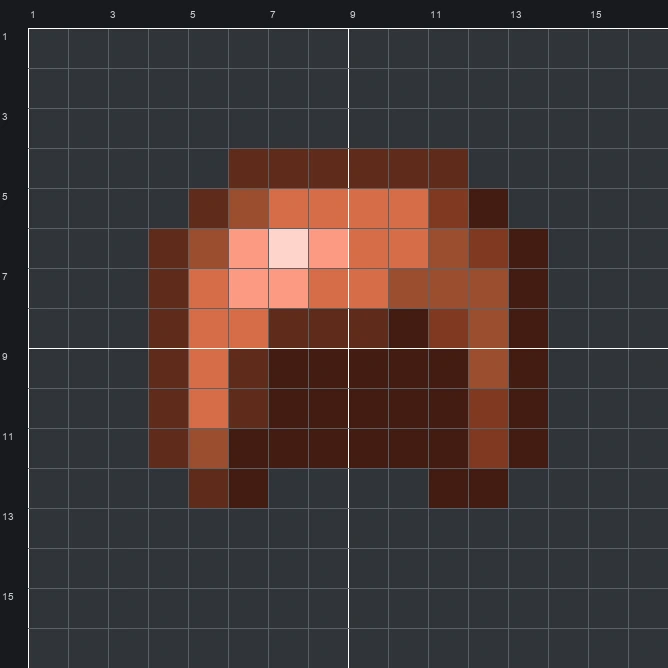
The schematic works with WorldEdit and Litematica on Java 1.21 and newer, built upright and one block thick. The grid image has numbered rows and columns for building by hand.
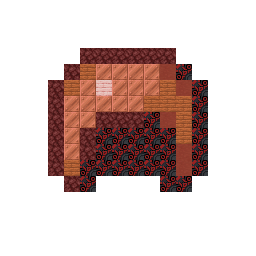
78 blocks · 6 block types
 Black Glazed Terracotta27
 Netherrack19
 Copper Block17
 Acacia Planks9
 Red Terracotta5
 Cherry Planks1
78 blocks · 4 block types
 Brown Wool60
 Red Wool13
 Pink Wool4
 White Wool1
78 blocks · 5 block types
 Brown Concrete46
 Red Concrete14
 Orange Concrete13
 Pink Concrete4
 White Concrete1
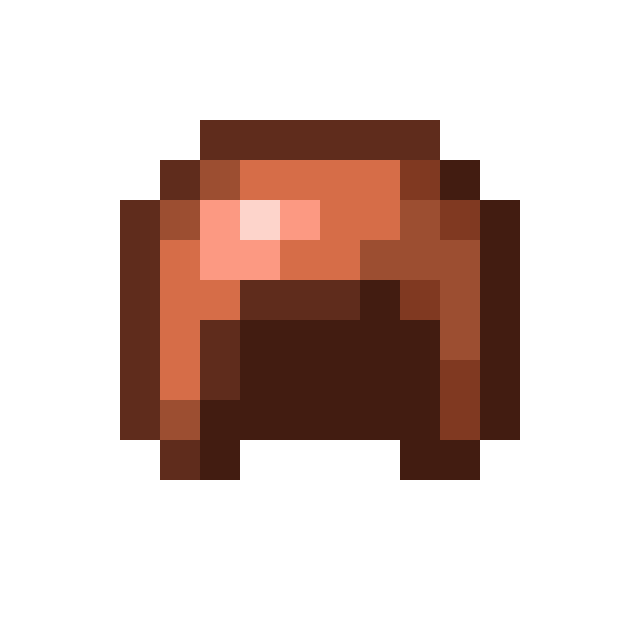
The Copper Helmet sprite features a classic rounded armor cap shape colored in warm, metallic orange and deep brown tones. A bright pale pink and peach highlight sits on the upper left curve to give the helmet a shiny, polished metal appearance, while a dark shaded hollow area marks the inside where a player's head would go.
Fitting neatly inside a 16 by 16 grid and using only 78 blocks, this Item Pixel Art template is a quick and practical build for survival worlds. It works very well as a decorative wall icon outside an armor shop, smithing room, or copper storage area.
 More Item Pixel Art
 Copper Golem Spawn Egg16×16 · 108 blocks
 Copper Hoe16×16 · 51 blocks
 Copper Door16×16 · 114 blocks
 Copper Horse Armor16×16 · 89 blocks
 Copper Chestplate16×16 · 138 blocks
 Copper Ingot16×16 · 135 blocks
 Copper Chain16×16 · 29 blocks
 Copper Lantern16×16 · 56 blocks
 Copper Boots16×16 · 88 blocks
 Copper Leggings16×16 · 104 blocks
 Copper Axe16×16 · 60 blocks
 Copper Nautilus Armor16×16 · 152 blocks
