
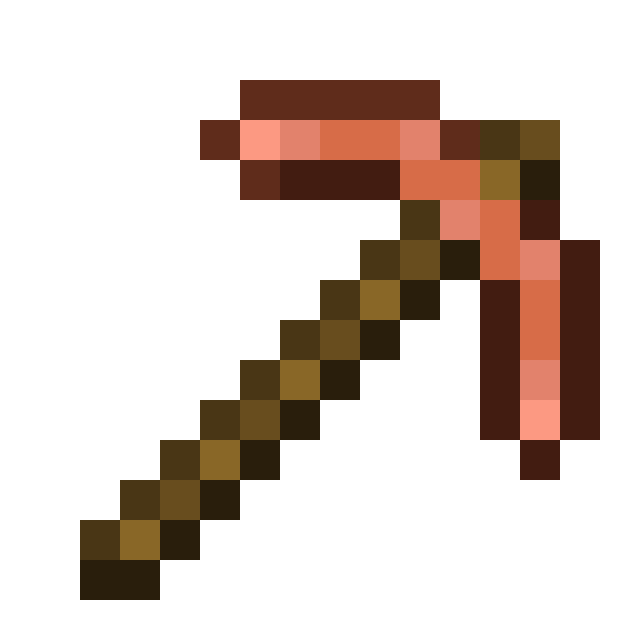
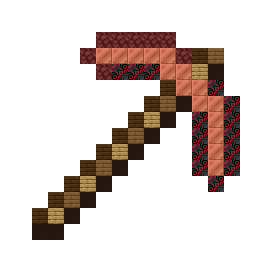
Build a Copper Pickaxe in Minecraft with this 16x16 item pixel art template. Includes a block-by-block grid, full material list, and schematic.
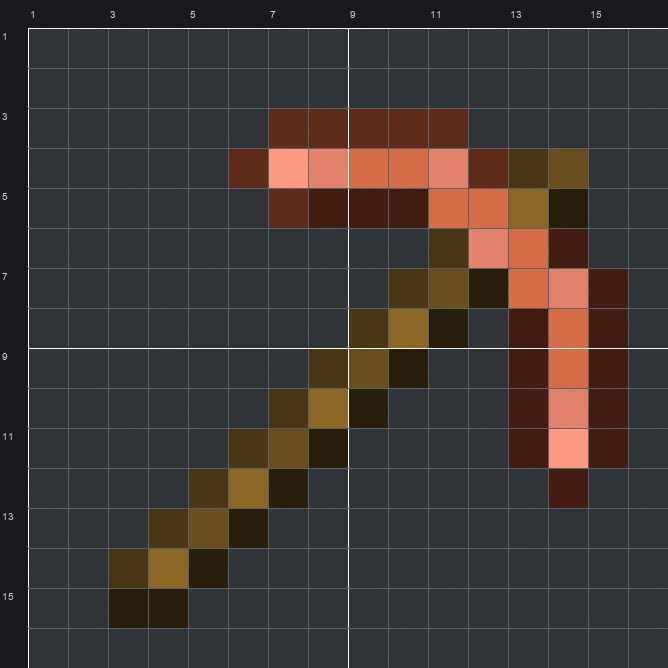
The schematic works with WorldEdit and Litematica on Java 1.21 and newer, built upright and one block thick. The grid image has numbered rows and columns for building by hand.
68 blocks · 7 block types
 Copper Block15
 Black Glazed Terracotta14
 Black Terracotta11
 Dark Oak Planks10
 Netherrack8
 Spruce Planks5
 Oak Planks5
68 blocks · 4 block types
 Brown Wool42
 Black Wool11
 Red Wool8
 Pink Wool7
68 blocks · 4 block types
 Brown Concrete42
 Black Concrete11
 Orange Concrete8
 Pink Concrete7
The Copper Pickaxe sprite shows a classic mining tool set on an angle, pairing a banded brown wooden handle with a curved metallic head shaded in warm orange, peach, and rust tones. Using 9 colours in the original sprite, the design captures bright highlights along the center of the blades and dark outlines that give the tool a crisp, recognizable silhouette.
Measuring 16 wide by 16 tall and using just 68 blocks in total, this compact Item Pixel Art build fits easily into most survival worlds. Players often place it above a mineshaft entrance, mount it on the wall of a smelter room, or hang it outside a blacksmith shop as a clear visual sign.
 More Item Pixel Art
 Copper Nugget16×16 · 33 blocks
 Copper Shovel16×16 · 53 blocks
 Copper Nautilus Armor16×16 · 152 blocks
 Copper Spear16×16 · 74 blocks
 Copper Leggings16×16 · 104 blocks
 Copper Sword16×16 · 84 blocks
 Copper Lantern16×16 · 56 blocks
 Copper Ingot16×16 · 135 blocks
 Copper Horse Armor16×16 · 89 blocks
 Cow Spawn Egg16×16 · 198 blocks
 Copper Hoe16×16 · 51 blocks
 Creaking Spawn Egg16×16 · 192 blocks
