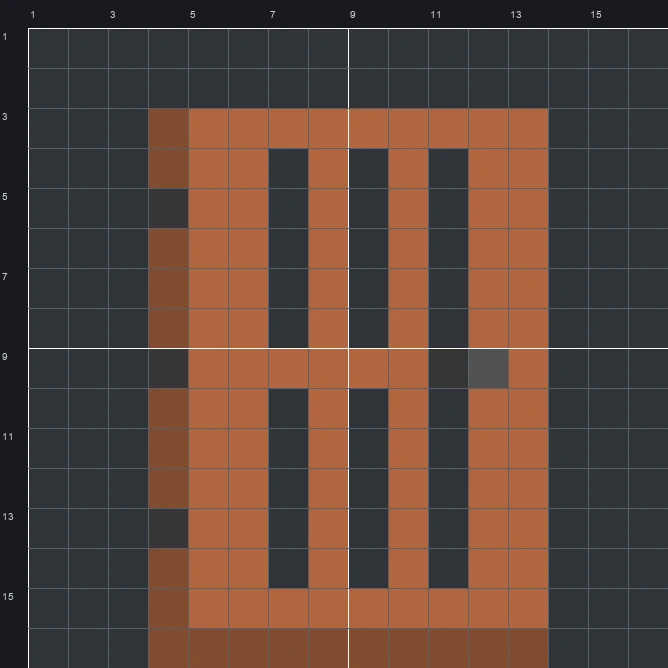
Build the Acacia Door item pixel art in Minecraft with this 16x16 template. Includes a step-by-step grid guide, full material list, and schematic.
The schematic works with WorldEdit and Litematica on Java 1.21 and newer, built upright and one block thick. The grid image has numbered rows and columns for building by hand.
110 blocks · 4 block types
 Acacia Planks851 stacks + 21
 Brown Wool20
 Gray Concrete4
 Deepslate1
110 blocks · 2 block types
Brown Wool1051 stacks + 41 Gray Wool5
110 blocks · 3 block types
 Red Concrete851 stacks + 21
 Brown Concrete20Gray Concrete5
The Acacia Door item icon shows a slatted wooden door rendered in warm orange-brown tones with a darker brown L-shaped border along the left and bottom edges to create depth. The design features six open vertical slots arranged in two rows of three, three dark gray hinges on the left side, and a two-tone gray latch on the right.
Fitting cleanly within a 16 by 16 grid and needing only 110 blocks across 4 block types, this sprite is a straightforward project for survival or creative worlds. The clean vertical bars and open spaces make it a recognizable decorative sign for a woodshop, storage room, or savanna village build.
 More Item Pixel Art
 Acacia Chest Boat16×16 · 174 blocks
 Acacia Hanging Sign16×16 · 148 blocks
 Acacia Boat16×16 · 165 blocks
 Acacia Sign16×16 · 132 blocks
 Abandoned Camp Map16×16 · 228 blocks
 Allay Spawn Egg16×16 · 148 blocks
 Amethyst Shard16×16 · 89 blocks
 Angler Pottery Sherd16×16 · 157 blocks
 Apple16×16 · 114 blocks
 Archer Pottery Sherd16×16 · 157 blocks
 Armadillo Scute16×16 · 60 blocks
 Armadillo Spawn Egg16×16 · 124 blocks