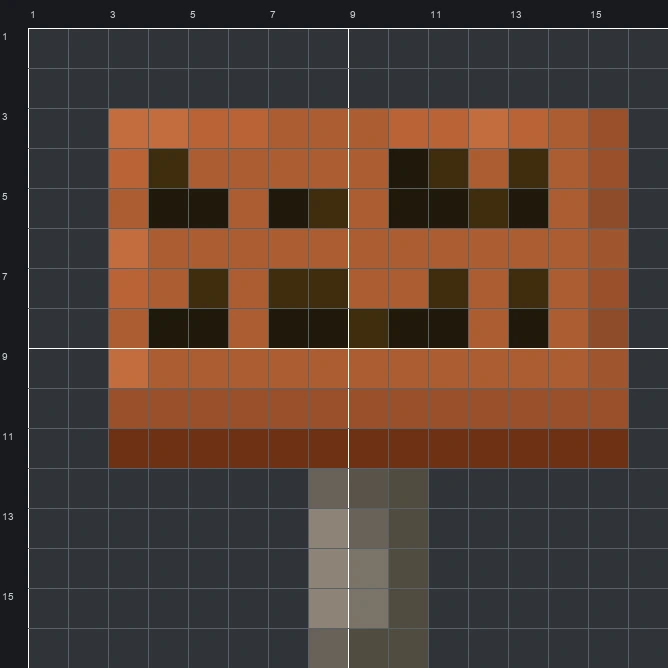
Build the Acacia Sign item pixel art in Minecraft with our 16x16 grid template, complete block material list, and step-by-step schematic.
The schematic works with WorldEdit and Litematica on Java 1.21 and newer, built upright and one block thick. The grid image has numbered rows and columns for building by hand.
132 blocks · 8 block types
 Acacia Planks791 stacks + 15
 Black Terracotta14
 Red Terracotta13
 Dark Oak Planks11
 Polished Deepslate6
 Light Gray Concrete5
 Tuff3
 Cyan Terracotta1
132 blocks · 5 block types
 Brown Wool911 stacks + 27
 Black Wool14
 Red Wool12
 Gray Wool10
 Light Gray Wool5
132 blocks · 5 block types
 Red Concrete771 stacks + 13
 Brown Concrete26
 Black Concrete14Light Gray Concrete8
 Gray Concrete7
The Acacia Sign is a familiar Minecraft item used to label storage chests, leave notes for friends, and mark roads. Within the 16 wide by 16 tall grid, the sprite shows a rectangular orange-brown wooden board mounted on a short grey-brown bark post, with two horizontal lines of dark pixels across the face to represent written text.
Recreating the 14 colours of the original sprite takes just 132 blocks, making it a compact weekend or single-session project. As an Item Pixel Art piece built mostly from warm planks and terracotta, it works very well as a decorative emblem on the front of a storage room, workshop, or savanna village build.
 More Item Pixel Art
 Acacia Hanging Sign16×16 · 148 blocks
 Acacia Door16×16 · 110 blocks
 Allay Spawn Egg16×16 · 148 blocks
 Acacia Chest Boat16×16 · 174 blocks
 Amethyst Shard16×16 · 89 blocks
 Acacia Boat16×16 · 165 blocks
 Angler Pottery Sherd16×16 · 157 blocks
 Abandoned Camp Map16×16 · 228 blocks
 Apple16×16 · 114 blocks
 Archer Pottery Sherd16×16 · 157 blocks
 Armadillo Scute16×16 · 60 blocks
 Armadillo Spawn Egg16×16 · 124 blocks