
Build the Birch Door item sprite in Minecraft with our pixel art guide. Includes a 16x16 block grid, full material list, and printable schematic.
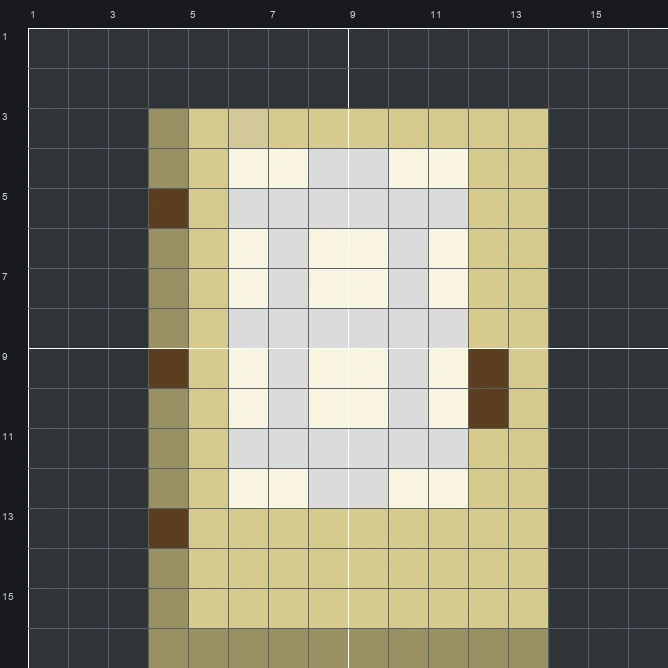
The schematic works with WorldEdit and Litematica on Java 1.21 and newer, built upright and one block thick. The grid image has numbered rows and columns for building by hand.
140 blocks · 6 block types
 End Stone60
 Iron Block30
 Bone Block24
 Oak Planks20
 Brown Concrete5
 Sandstone1
140 blocks · 3 block types
 White Wool1151 stacks + 51
 Light Gray Wool20
 Brown Wool5
140 blocks · 3 block types
 White Concrete1151 stacks + 51
 Light Gray Concrete20Brown Concrete5
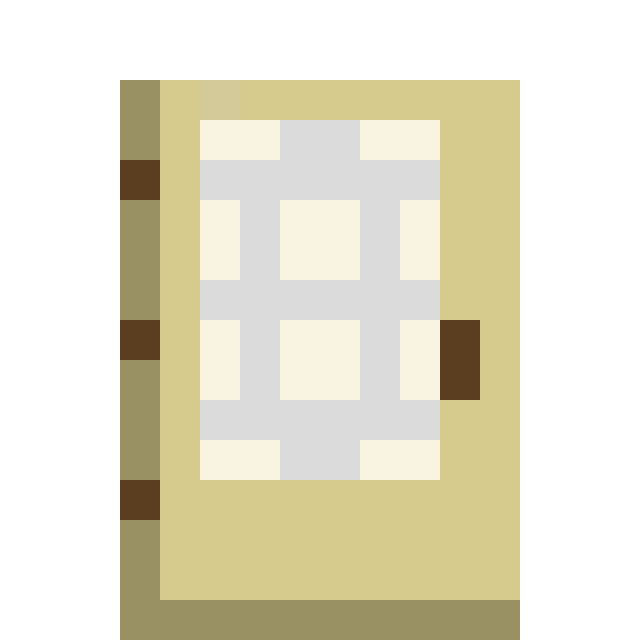
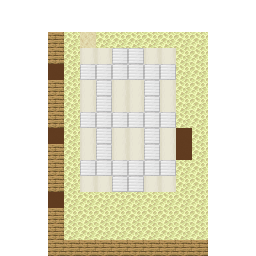
The Birch Door item sprite displays the upper section of Minecraft's pale wooden door, inspired by traditional sliding screen panels. Its rectangular frame is pale yellow with a darker tan shadow along the left and bottom edges, three small dark brown hinges on the left side, and a vertical dark brown handle on the right. Inside the frame sits a crisp white and light grey grid pattern that mimics paper screen panes.
Because it fits neatly inside a 16 wide by 16 tall grid and takes 140 blocks in total, this Item Pixel Art template is a quick, clean project for survival or creative worlds. Using just 6 block types in the mixed palette, it works well as a workshop sign above a wood storage room or as part of a wall displaying every door style in the game.
 More Item Pixel Art
 Birch Chest Boat16×16 · 174 blocks
 Birch Hanging Sign16×16 · 148 blocks
 Birch Boat16×16 · 165 blocks
 Birch Sign16×16 · 132 blocks
 Bell16×16 · 114 blocks
 Black Bundle16×16 · 131 blocks
 Beetroot16×16 · 69 blocks
 Black Candle16×16 · 91 blocks
 Beetroot Soup16×16 · 74 blocks
 Black Cushion16×16 · 104 blocks
 Beetroot Seeds16×16 · 66 blocks
 Black Dye16×16 · 129 blocks
